The store will not work correctly when cookies are disabled.
We use cookies to make your experience better.To comply with the new e-Privacy directive, we need to ask for your consent to set the cookies. Learn more.
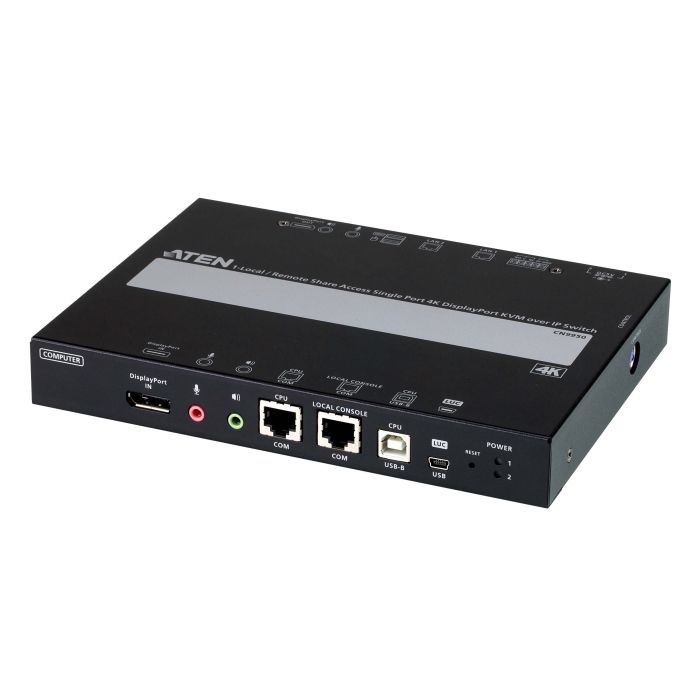
ATEN CN9950 1-Port 4K DisplayPort KVM over IP Switch with Local or Remote Access, Virtual Media, Power/LAN Redundancy, Audio, Remote PC Reboot and RS-232 Control
Supports DisplayPort resolution up to 4K DCI (4096 x 2160) @ 30 Hz*
A mini USB port in the front panel can serve as a Virtual Media USB port or a Laptop USB Console (LUC) port
Compact and slim design for space utility optimization
Supports 5-pin Relay/DI Terminal for environment monitoring and remotely reboot control
Provides an FPGA graphics processor for better image quality
Two 10 / 100 / 1000 Mbps NICs for redundant LAN or two IP operation
Dual power supply to ensure seamless connectivity
Provides over IP capability to DisplayPort KVM switches without over IP functionality
Allows access to the CN9950 via a built-in serial viewer, or via third-party software (such as PuTTY) for Telnet and SSH sessions
*Audio is not supported by CN9950's DisplayPort and can only be transmitted through its 3.5 mm audio ports.
Management
Complies to the RS-232 standards for serial control
Up to 64 user accounts – up to 32 users can simultaneously share control
Console access right management
End session feature – administrators can terminate running sessions
Event logging and Windows-based Log Server support
Event Logging – the CN9950 can record all events that take place on it and write them to a searchable database
Supports instant notification of critical system events via email, SNMP trap, and Syslog
Firmware upgradable via remote access
Out of Band support – access the CN9950 through its serial port using a dial-up connection
Local/Remote Share Mode conveniently grants shared or exclusive console privilege
Port Share Mode allows multiple users to gain access to a server simultaneously
DDNS – allows mapping of a dynamic IP address assigned by a DHCP server to a host name
Supports export/import of user account and configuration settings
Supports permission-controlled browser operation
Supports IPv6
Integration with ATEN CC2000 Management Software
Integration with ATEN CCVSR Video Session Recording Software
Easy-to-Use Interface
Browser-based and AP GUIs offer a unified multi-language interface to minimize user training time and increase productivity
Multiplatform client support (Windows, Mac, Linux, Sun)
Multibrowser support (IE, Firefox, Safari, Opera, Chrome)
Browser-based UI in pure Web technology allows administrators to perform administrative tasks without pre-installed Java software package requirements
Full-screen or sizable and scalable Virtual Remote Desktop
Magic Panel with configurable function for quick launch
Advanced Security
Smart Card/CAC Reader support
External authentication support: RADIUS, LDAP, LDAPS, and MS Active Directory
Supports TLS 1.2 data encryption and RSA 2048-bit certificates to secure users logging in from browsers
Flexible encryption design allows users to choose any combination of 56-bit DES, 168-bit 3DES, 256-bit AES, 128-bit RC4 or Random for independent keyboard/mouse, video, and virtual media data encryption
Supports IP/MAC Filter
Supports password protection
Private CA
Virtual Media
Virtual media enables file applications, OS patching, software installation and diagnostic testing
Works with USB-enabled servers at OS and BIOS level
Supports USB 1.1 and USB 2.0 DVD/CD drives, USB mass storage devices, PC hard drives, folders and ISO images
Virtual Remote Desktop
Video quality and video tolerance can be adjusted to optimize data transfer speed; monochrome color depth, threshold, and noise settings can be adjusted for compression of the data bandwidth in low-bandwidth situations
Full-screen video display or scalable video display
Message Board for communication among remote users
On-screen keyboard with multi-language support
Mouse DynaSync™ – automatically synchronizes the local and remote mouse movements
Supports Exit Macros
BIOS-level access
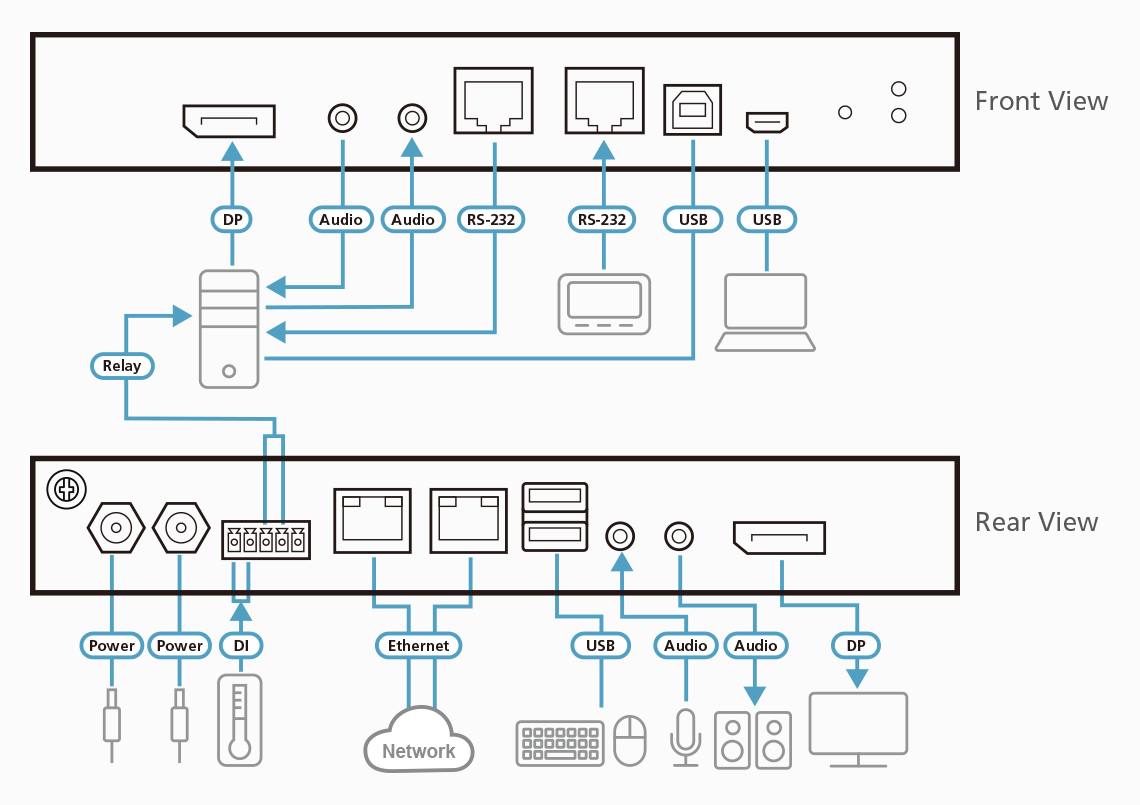
Diagram
Content
1x CN9950 4K DisplayPort KVM over IP Switch
1x DisplayPort cable
1x USB cable (USB-A to USB-B)
1x USB cable (USB-A to Mini-USB)
1x power adapter and power cord
1x control terminal block
1x mounting kit
1x foot pad set
1x user instructions
Specifications
Connectors
Console Ports
2 x USB Type A Female (White) 1 x DisplayPort Female (Black) 1 x Mini Stereo Jack Female (Green) 1 x Mini Stereo Jack Female (Pink)
KVM Ports
1 x USB Type B Female (White) 1 x DisplayPort Female (Black) 1 x Mini Stereo Jack Female (Green) 1 x Mini Stereo Jack Female (Pink)
LAN Ports
2 x RJ-45 Female
Power
2 x DC Jack
Serial
2 x RJ-45 Female
Control
1x PS/2 Female
Laptop USB Console (LUC) Port
1 x USB Mini-B Female
Switches
Reset
1 x Semi-recessed pushbutton (Black)
Emulation
Keyboard / Mouse
USB
LEDs
Power
2 (Green)
Video
Local console - 4096 x 2160 @ 30 Hz Remote console - 4096 x 2160