The store will not work correctly when cookies are disabled.
We use cookies to make your experience better.To comply with the new e-Privacy directive, we need to ask for your consent to set the cookies. Learn more.
One Combo Graphic Console Module can control a local computer and a matrix KVM switch (KM0932/KM0532)
Supports PS/2 and USB keyboards and mice(Console)
RS-232 port login support permits an administrator to control the KVM port access for all consoles connected to switch – any console can be assigned to access any KVM port from a single interface point
Superior Video Quality – 1920 x 1200 @ 60 Hz up to 150 meters; 1280 x 1024 @ 60 Hz up to 200 meters
The KA7230S Console Module offers secure access to the servers in a Matrix KVM Switch (KM0932/KM0532) from a PS/2 or USB console (monitor, keyboard, and mouse) up to 200 meters away. It provides an extra computer port for integration with a computer workstation, enabling users to seamlessly switch between the local computer and the servers in the Matrix KVM Switch. The KA7230S also features an intuitive graphical user interface, the Graphical OSD, with easy-to-use menus and icons that enable easy access and efficient management.
KA7230S has a built-in RS-232 port. Administrators can establish a serial terminal login to the Console Module in order to control the KVM port access for all consoles connected to switch – any console can be assigned to access any KVM port from a single interface point. This function is extremely useful in large data centers where the display of all the consoles can be projected onto a wall for easy viewing of all operations, and the entire installation can be monitored on a port-by-port basis.
Features
One Combo Graphic Console Module can control a local computer and a matrix KVM switch (KM0932/KM0532)
Supports PS/2 and USB keyboards and mice (Console)
Switch between your workstation computer and the matrix KVM switch
Graphical OSD-intuitive, easy-to-use graphical On Screen Display to manage servers
RS-232 port login support permits an administrator to control the KVM port access for all consoles connected to switch – any console can be assigned to access any KVM port from a single interface point
Connects to matrix KVM switch via Cat 5e/6 cable
Superior Video Quality – 1920 x 1200 @ 60 Hz up to 150 meters; 1280 x 1024 @ 60 Hz up to 200 meters
Manual video gain control for fine tuning
Convenient computer selection via intuitive hotkey combinations or graphical OSD menus
Firmware upgradeable
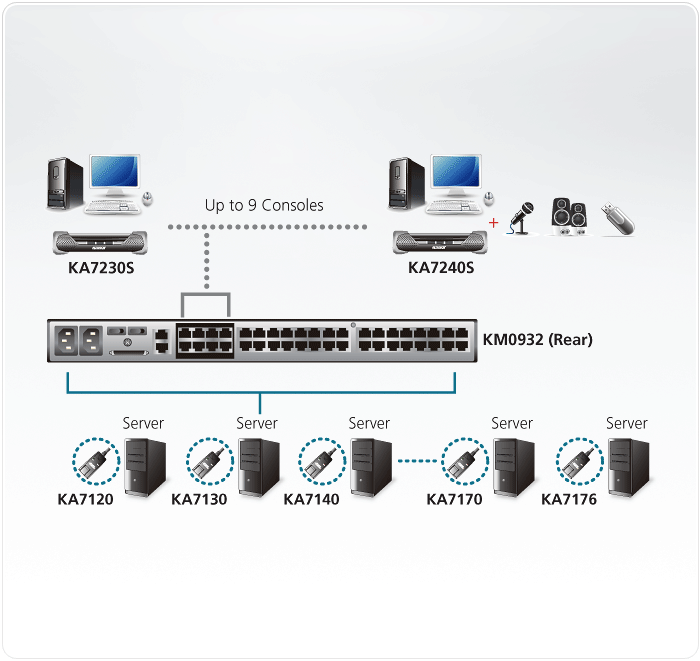
Diagram
Content
1x KA7230S PS/2-USB Console Module with stacking brackets
1x 2L-5202U Custom KVM Cable (VGA, USB; 1.8m/6ft)
1x 0AD8-1605-24M1 Power Adapter
1x Mounting Kit
1x User Instructions
Specifications
Computer Connections
1
Console Connections
1
Port Selection
GUI, Hotkey
Connectors
Console Ports
2 x USB Type A Female (White) 1 x 6-pin Mini-DIN Female (Purple) 1 x 6-pin Mini-DIN Female (Green) 1 x HDB-15 Female (Blue)
Local Computer KVM Port
1 x SPHD-17 Female (Yellow)
KVM Switch Ports
2 x RJ-45 Female
RS-232
1 x DB-9 Male (Black)
Power
1 x DC Jack
Switches
Firmware Upgrade
1 x Slide
Video Gain Adjustment
2 x Pushbutton
Selection
1 x Pushbutton (Local/Remote)
LEDs
Power
1 (Blue)
Online
1 (Green)
Local
1 (Orange)
Remote
1 (Orange)
Emulation
Keyboard / Mouse
PS/2; USB (PC, Sun, Mac)
Video
1920x1200@60Hz (150 m); 1280x1024@60Hz (200 m)
Scan Interval
1-240 Seconds
Power Consumption
DC5.3V:6.12W:37BTU/h
Note: ● The measurement in Watts indicates the typical power consumption of the device with no external loading. ● The measurement in BTU/h indicates the power consumption of the device when it is fully loaded.
Environmental
Operating Temperature
0 - 50°C
Storage Temperature
-20 - 60°C
Humidity
0-80% RH, Non-condensing
Physical Properties
Housing
Metal
Weight
1.22 kg ( 2.69 lb )
Dimensions (L x W x H)
22.71 x 17.15 x 5.48 cm (8.94 x 6.75 x 2.16 in.)
Note
For some of rack mount products, please note that the standard physical dimensions of WxDxH are expressed using a LxWxH format.